Skip to content
5.0 on App Store

Your sleep,
explained.
Only to you

Snollo is a private sleep tracker for iPhone and Apple Watch. On-device AI detects snoring and analyzes sleep stages. Your recordings never leave your device — stored only in your iCloud.
Snollo — AI sleep tracker app for iPhone and Apple Watch
How It Works

Set it up in 10 seconds. Sleep. Learn.

Snollo doesn't auto-start. Open the app and tap Start before bed — otherwise nothing is recorded.

Wear an Apple Watch to add heart-rate, breathing, and blood-oxygen charts (requires Apple Health permission). Without a Watch, place your iPhone on the bed near you and grant Microphone + Motion & Fitness permissions so sleep stages can be detected. Data only appears once the matching permission is granted — that's Apple's privacy model, and Snollo follows it.

Step 1

Tap Start Before Bed

Open Snollo and tap Start. Tracking does not begin on its own. Place iPhone on the bed near you if you sleep without an Apple Watch; the nightstand is fine if you wear one.

Step 2

Snollo Listens While You Sleep

Overnight, entirely on your iPhone — no third-party servers. Every sound identified. Every sleep cycle mapped. Saved to your private iCloud.

Step 3

Wake Up Knowing Why

Open Snollo in the morning. Your score is ready. Your clipped sounds are waiting. Listen back and finally understand your nights.

Compare

Snollo vs. Other Sleep Apps

The only sleep tracker that combines Apple Watch sleep stages with on-device snore detection — all on the free tier.

Feature comparison: Snollo vs Sleep Cycle vs SnoreLab vs Pillow
Feature Snollo Sleep Cycle SnoreLab Pillow
Audio processed on-device Always Cloud Cloud On-device
Apple Watch sleep stages Free Subscription Not available Free + Premium
Snore detection Free Subscription Free (limited) Premium only
Audio clip playback Free No Yes Premium only
Separate account No — uses Apple ID Required Optional Required (premium)
Subscription required Optional Yes (~$40/yr) Yes (~$40/yr) Yes (~$40/yr)

Competitor features and pricing based on publicly available information as of April 2026.

Privacy First

Your Sleep Data Stays Yours — Privacy-First by Design

We built Snollo so your sleep recordings and analysis live on your iPhone and in your own iCloud — across the Apple devices you sign into. No separate Snollo account. No selling your information.

Your Microphone Input
Your iPhone On-Device AI
Your iCloud Private Storage
App Preview

See your sleep tracker in action.

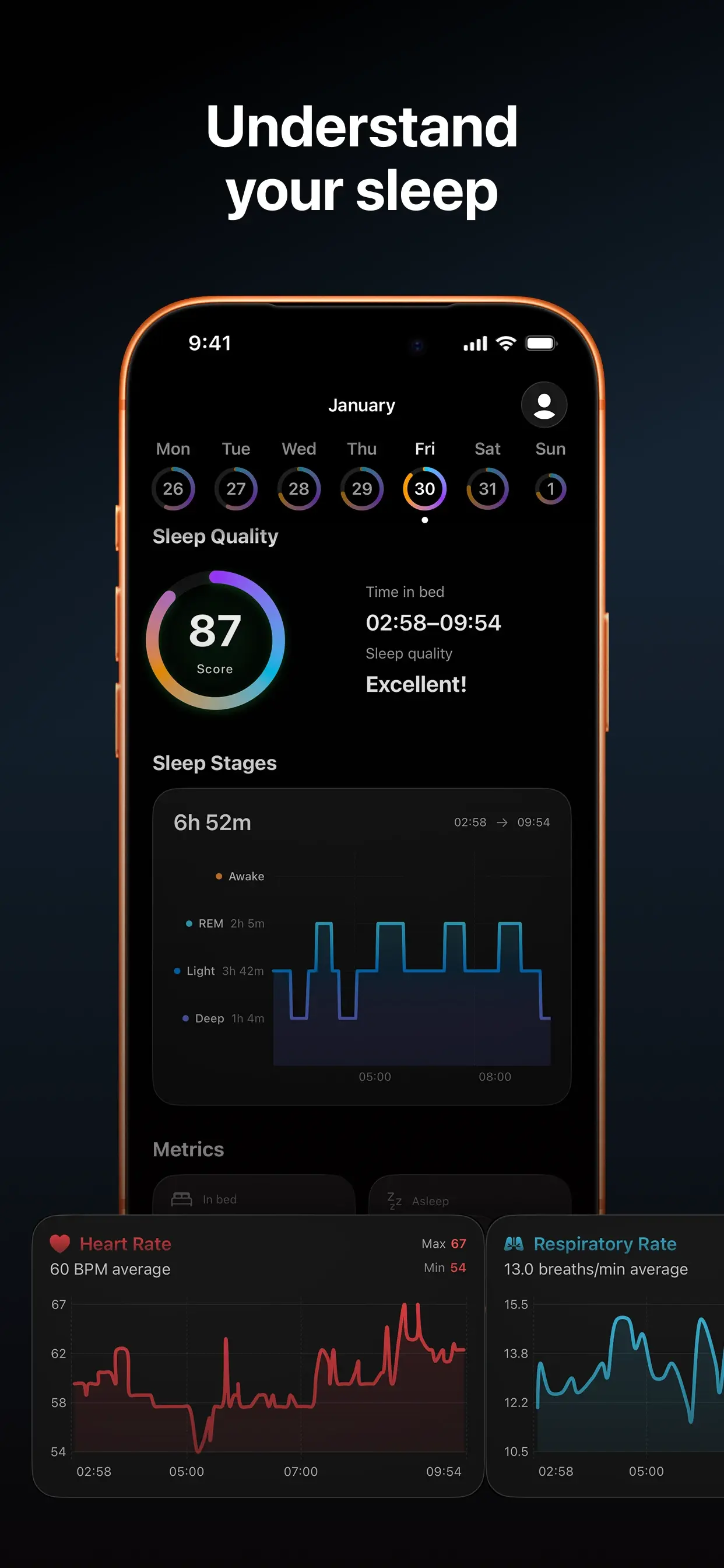
Sleep quality score with REM, Deep, Core sleep stages chart and heart rate tracking
Sleep Quality & Stages

Score, REM, Deep & Core cycles with heart rate

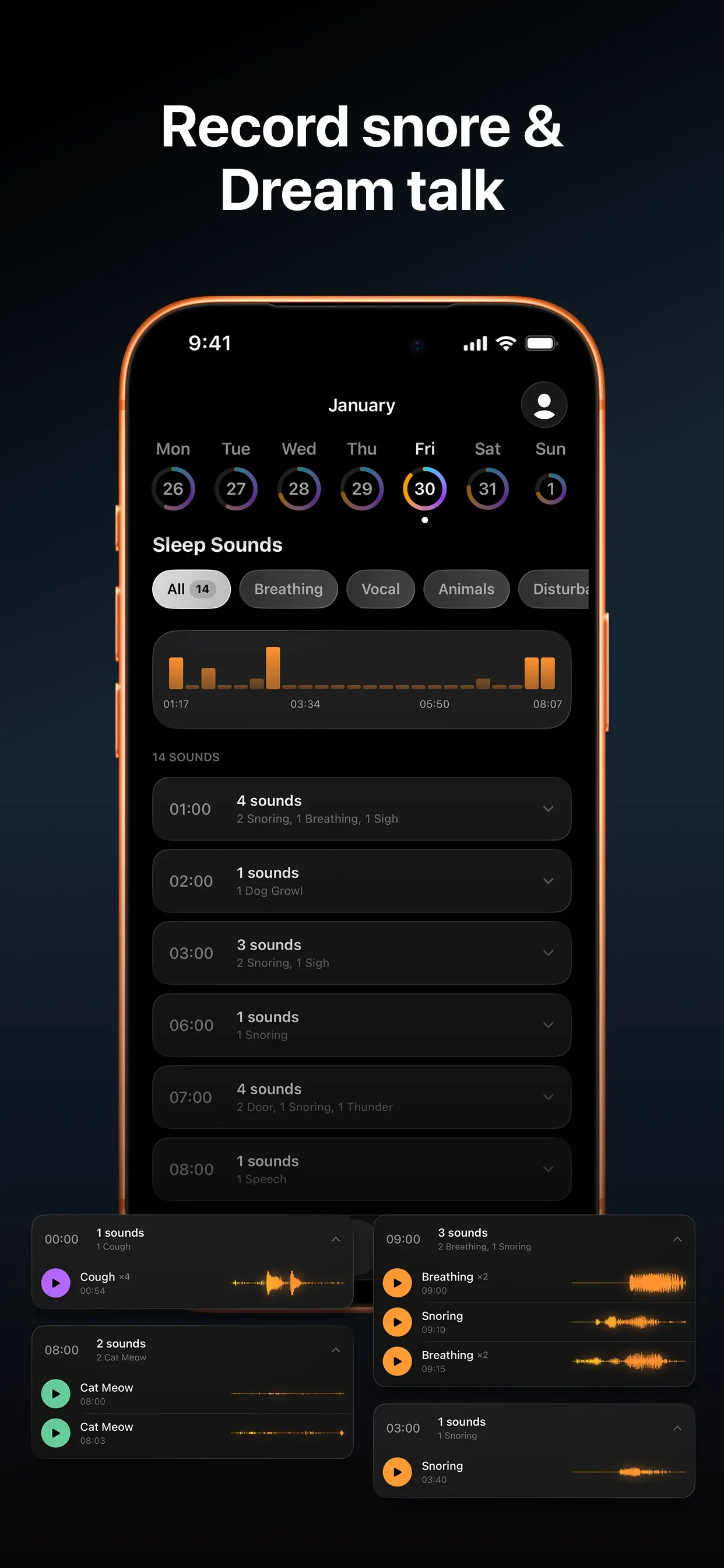
AI snoring detection and dream talk recording with sound timeline
Sound Detection

Record snore, breathing & dream talk

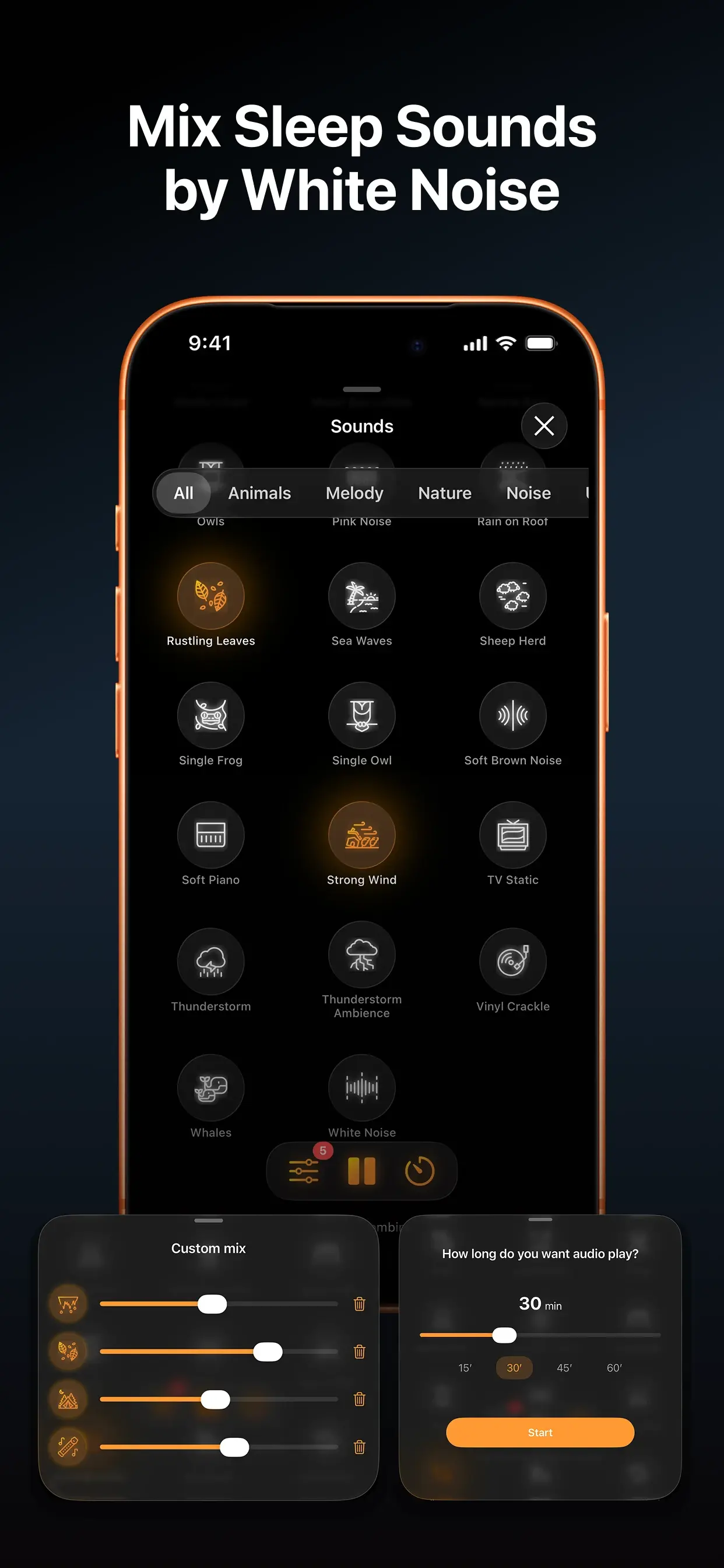
Sleep sounds mixer with white noise, nature, and ambient sound categories
Soundscapes

Layer white noise, rain, forests, meditation — sleep timer included

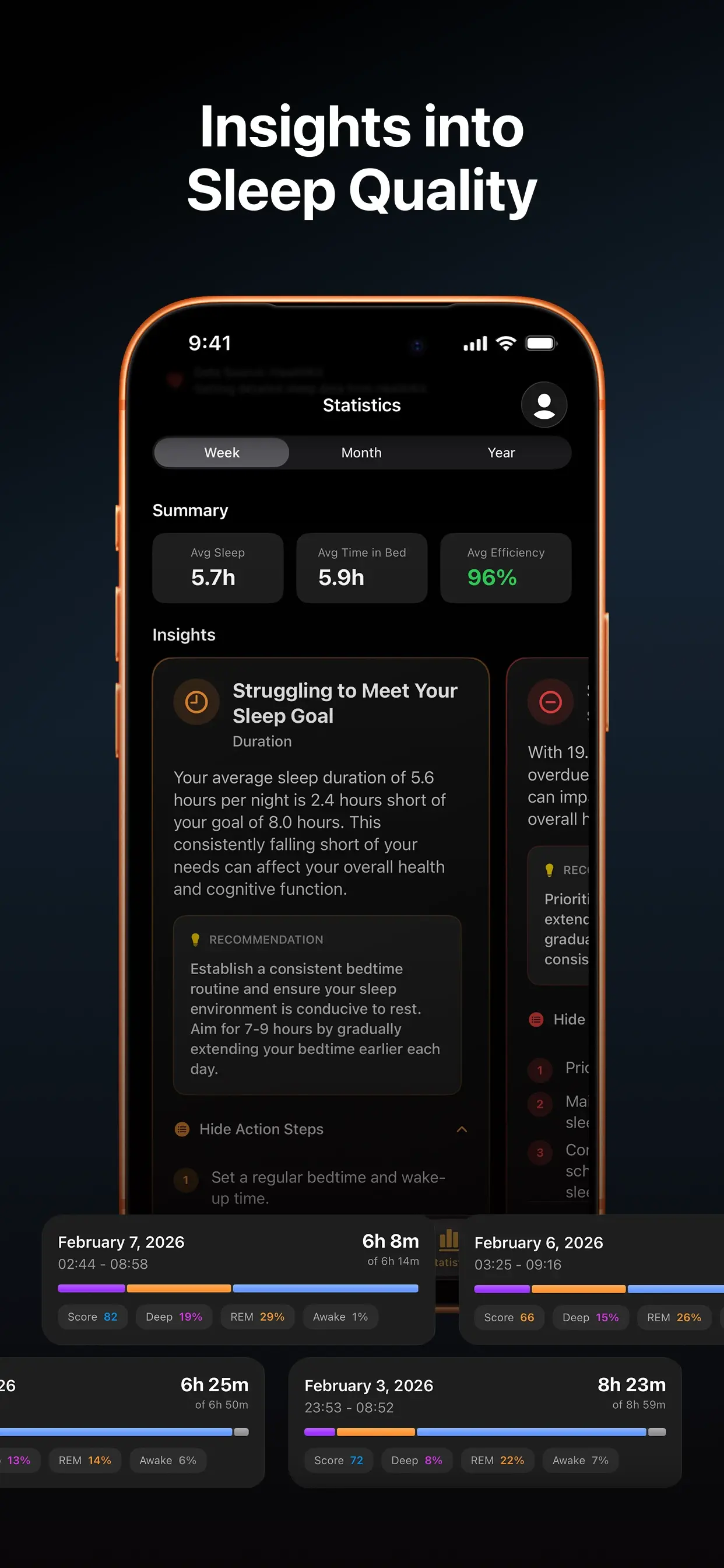
Sleep statistics with weekly insights, AI recommendations and sleep history
Morning Verdict

A clear read on last night — and what to change tonight

Download on App Store
Wall of Love

What Snollo Users Are Saying

★★★★★

"This app changed my mornings. The sleep stage breakdown is eye-opening, and knowing my data is private makes me feel secure."

S
Sarah L.
Feb 12, 2026
★★★★★

"Finally found out why I was so tired. The snoring detection caught exactly what was happening in the middle of the night."

M
Mark D.
Jan 28, 2026
★★★★★

"Clean interface, no subscriptions forced down your throat, and the Apple Watch integration is flawless."

E
Elena G.
Feb 05, 2026
Who It's For

Built for three kinds of iPhone users

S
The snore investigator

"I want to actually hear what I'm doing overnight — and finally do something about it."

You snore, you're pretty sure you snore, or your partner says you snore. Snollo records classified audio clips so you wake up with evidence: timestamps, intensity, and playback — not just a number.

Sound clips Snore timeline Listen-back
A
The Apple Watch power user

"I already wear my Watch to bed. I want the most accurate sleep stage data possible."

Snollo combines Apple Watch heart rate variability, heart rate, SpO₂, and motion with iPhone microphone snore detection. You get REM, Deep, and Core stage breakdown plus a full sound timeline — one app, both sensors.

Heart rate variability REM / Deep / Core SpO₂
P
The privacy-conscious

"I'm not sending 8 hours of bedroom audio to a company's servers. That's not a trade-off I'm making."

Sound classification runs entirely on your iPhone. Raw audio is processed in memory and discarded; only event metadata and the clips you save go to your own iCloud, under your Apple ID — across the Apple devices you sign into.

On-device AI Your own iCloud Uses Apple ID
Pricing

Free to start. Premium when you're ready.

Prices shown for your region, fetched from the App Store. Apple handles all billing.

Monthly
$5.99 /month
Save 44% Yearly
$39.99 /year
Start Free on App Store

Cancel anytime in Settings → Apple ID → Subscriptions.

FAQ

Frequently Asked Questions About Sleep Tracking

Do I need an Apple Watch to use Snollo?
No — Snollo works without an Apple Watch. The iPhone microphone detects snoring, breathing, coughing, and sleep talking, and you still get sleep stages. Without a Watch, sleep stages are derived from the iPhone's microphone and motion sensors, so you must grant both Microphone and Motion & Fitness permissions when the app asks — without them, stages won't be detected. What you don't get without a Watch: the heart-rate, breathing-rate, and blood-oxygen (SpO2) charts — those require Apple Watch sensors and Apple Health permission so Snollo can read them. Placement also changes: without a Watch the iPhone must be on the bed near you so the mic can reach you; with a Watch it can stay on the nightstand. All of these are Apple privacy controls — Snollo respects them, so any chart or metric only appears once you grant the matching permission.
Do I need to start tracking each night?
Yes. Snollo does not start on its own. If you don't open the app and tap Start before bed, nothing is recorded: no snore detection, no sleep stages, no audio clips. Once you tap Start, the session runs overnight until you stop it in the morning.
Where should I put my iPhone at night?
If you wear an Apple Watch to bed, the iPhone can stay on the nightstand — the Watch handles motion, heart rate, and breathing. If you don't wear a Watch, place the iPhone on the bed near you, mouthpiece facing you, so the microphone can pick up snoring and breath sounds clearly.
What permissions does Snollo need?
Snollo asks for three iOS permissions, all of which are Apple privacy controls that Snollo fully respects: Microphone (to detect snoring, breathing, coughing, sleep talking — required), Motion & Fitness (to detect sleep stages from iPhone movement when you sleep without an Apple Watch — required for stages in that case), and Apple Health (to read Apple Watch heart rate, HRV, blood oxygen, and breathing rate, and to write your sleep data back to Health — required for the heart-rate, breathing-rate, and SpO2 charts and for Apple Health sync). The matching data only appears in the app if you grant the corresponding permission. If a chart or metric is empty, the most likely cause is a permission that was declined or revoked — check Settings → Privacy & Security and Settings → Health → Data Access to grant access.
How accurate is the snoring detection?
Snollo classifies audio on your iPhone in real time. In our testing, it accurately identifies snoring, breathing patterns, coughing, and sleep talking. You can listen back to any detected sound to verify it yourself.
Where is my sleep data stored?
Snollo classifies audio on your iPhone. Anything saved — sleep stages, event metadata, the short clips you choose to keep — lives in your own iCloud, under your Apple ID, across the Apple devices you sign into.
Does it drain my battery overnight?
In our tests, overnight iPhone battery drain is typically 10–15%. We recommend keeping your phone plugged in if you use the continuous audio recording feature.
Does Snollo share my sleep data with anyone?
Your sleep data is yours. Audio is classified on your iPhone; nothing about classification leaves the device. The saved results — sleep stages, event metadata, and any clips you keep — live in your own iCloud, under your Apple ID. There is no separate Snollo account, and the data syncs across the Apple devices you choose, not anywhere else.
What sleep stages does Snollo detect?
Snollo tracks Core sleep (Apple's term for what other apps call Light), Deep sleep, and REM sleep using data from your Apple Watch heart rate and motion sensors. Each morning you get a full breakdown — how long you spent in each stage and how it compares to your personal baseline.
What's the difference between Snollo free and Premium?
The core app includes AI sound detection, basic sleep stages, Apple Watch integration, and 7 days of history — no subscription required. Premium adds unlimited recordings, full history, the complete sound library, and detailed weekly stats.
Does this sleep tracker work without Apple Watch?
Yes — Snollo works without an Apple Watch. The iPhone microphone detects snoring, breathing, coughing, and sleep talking, and you still get sleep stages. Without a Watch, sleep stages are derived from the iPhone's microphone and motion sensors, so you must grant both Microphone and Motion & Fitness permissions when the app asks — without them, stages won't be detected. What you don't get without a Watch: the heart-rate, breathing-rate, and blood-oxygen (SpO2) charts — those require Apple Watch sensors and Apple Health permission so Snollo can read them. Placement also changes: without a Watch the iPhone must be on the bed near you so the mic can reach you; with a Watch it can stay on the nightstand. All of these are Apple privacy controls — Snollo respects them, so any chart or metric only appears once you grant the matching permission.
Can Snollo detect snoring without Apple Watch?
Yes. Sleep tracking with snore detection on iPhone works fully without Apple Watch. Snollo's on-device model analyzes microphone audio in real time — classifying snoring, breathing, coughing, and sleep talking. Apple Watch improves sleep stage accuracy but is not required for snore detection.
Is Snollo free?
Yes. Snollo is free to download from the App Store — no credit card required. The free tier includes nightly snore detection, AI sound classification, sleep stage breakdown when you wear an Apple Watch (motion-based sleep inference without one), Apple Health sync, and 7 days of history. Premium ($5.99/month or $39.99/year in your region) is an auto-renewable subscription that adds an extended sound library (50+ sounds), unlimited history, and AI recommendations.
Does Snollo work on iPad?
Snollo is designed for iPhone and Apple Watch. iPad is not a supported platform because the microphone placement on iPad is not suited for overnight bedside recording, and the app's Apple Watch integration relies on an iPhone being present. For best results, use Snollo on an iPhone 12 or later running iOS 17+.
What happens if I cancel Premium?
If you cancel Snollo Premium, your account reverts to the free tier. Your sleep history, sound recordings from the past 7 days, and all Apple Health data are preserved. You keep access to all core features — nightly snore detection, sleep stage breakdown, and Apple Watch integration — permanently, at no cost. No data is deleted when you cancel.
How does Snollo compare to Apple's built-in Sleep app?
Apple's native Sleep app (in the Health app) tracks time in bed and basic sleep stages via Apple Watch but does not detect or record snoring sounds, does not classify overnight audio events, and does not provide a sleep quality score. Snollo adds snore detection via the iPhone microphone, audio clip playback, sound classification (breathing, coughing, sleep talking), and a detailed sleep quality score — all processed on-device alongside the Apple Watch data that the Health app already collects.
Read up

From the Snollo blog

Try it tonight.

Your sleep data is yours. It lives on your iPhone and in your iCloud — across the Apple devices you sign into.

Download on App Store
★ 5.0 Rating Private by design Apple Watch Sync